
While simple programs can be written in a single component, in many cases you will want to develop multi-component projects in which your project is broken down into separate concerns. Developing more complex projects using a set of well-separated components will make your code easier to understand and maintain.
Dana uses a specific convention to organise source code for multi-component projects, which separates type definitions from component implementations in parallel directory trees.
Developing a multi-component project
All multi-component projects will have a directory called resources. The resources directory contains all type definitions used in the project, and can have sub-directories representing packages. In most situations, components which implement interfaces must appear in a directory which has the same relative path from the project root as the interface definition but without resources at the start. This approach separates types from implementations while allowing the Dana runtime to easily locate implementations of interfaces.
This is a little hard to explain in words, so let's use an example. Imagine we're creating a command-line calculator project, in a directory called projectx. We decide to use one main component, providing the App interface, and two utility components: a parser, to parse command-line input into a set of arithmetic tokens, and an arithmetic processor, to calculate the result of a set of arithmetic tokens.
Our resulting project directory would be organised as shown below:
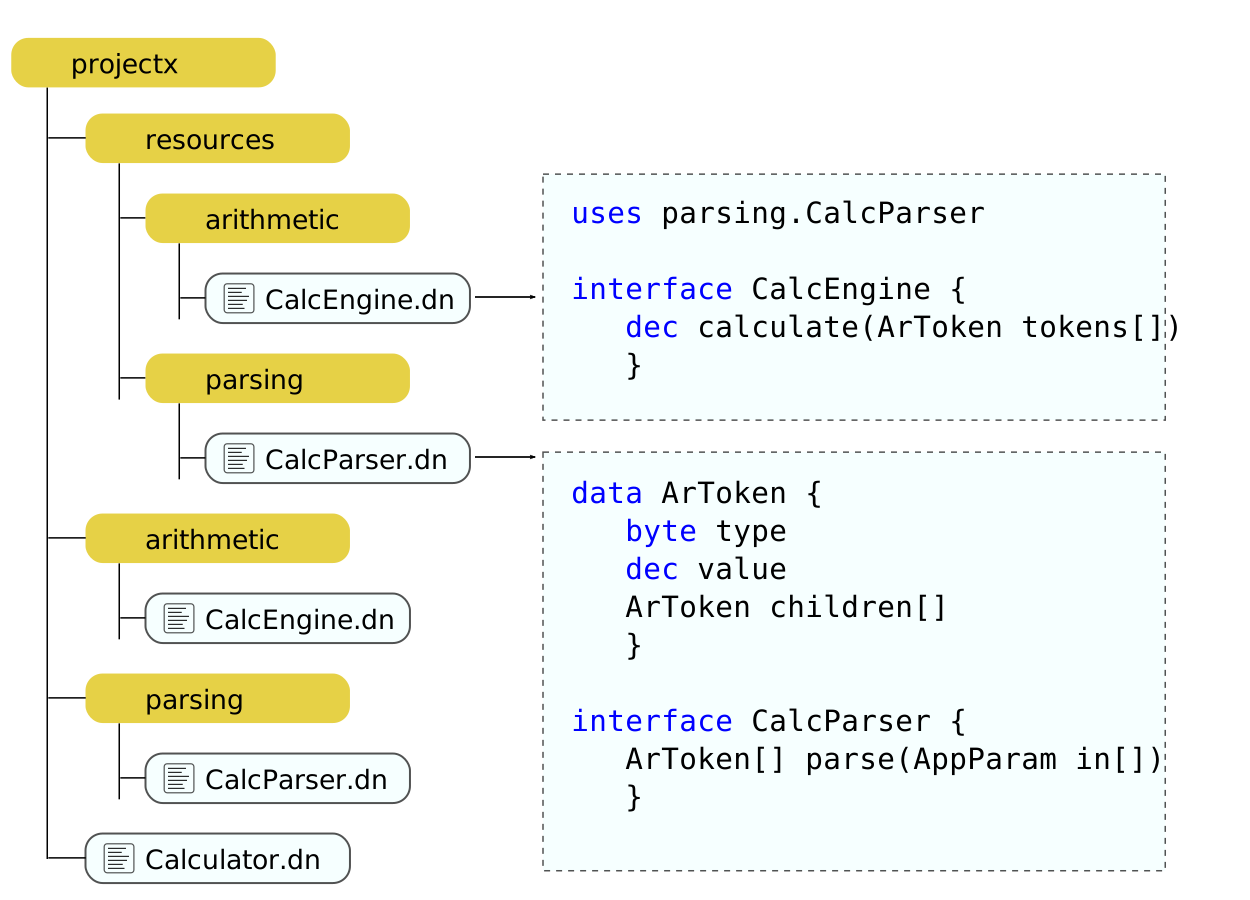
The lines in this diagram indicate in-directory relationships; the projectx directory therefore contains four items (three directories and one file) while the resources directory contains two directories.
The resources directory, and its sub-directories, is used to contain source code that describes interface and data types. In general, a source file that contains a type definition (such as an interface) should have the same file name as the type name that it defines.
The project root directory, and each of its sub-directories (except for the resources sub-directory), contains source files of components that implement interfaces. The general convention for these source files is to name them with the same name as the main interface type that the component provides.
Using this example, the file Calculator.dn might have the following code:
component provides App requires parsing.CalcParser parser,
                                arithmetic.CalcEngine engine {

    int App:main(AppParam params[])
        {
        ArToken tokens[] = parser.parse(params)

        dec result = engine.calculate(tokens)

        return 0
        }
    }
When we try to compile this component, the compiler will need to search for each of the interface types used by the component. This is done by converting any dots to slashes and adding .dn to the end, then searching for the corresponding path within the resources directory. The required interface parsing.CalcParser therefore becomes resources/parsing/CalcParser.dn.
Assuming you write the components implementing the other two interfaces yourself, we can compile every component in a project (recursively) from a command prompt in its root directory, using the command:
dnc .
We then run the project with the example command:
dana Calculator 4 * 5
When we do this, the Dana runtime tries to automatically locate default implementing components of each required interface that has been declared by this component. The runtime does this in a very similar way to the approach used by the compiler; for each required interface, a search path is derived by converting any dots to slashes and then adding ".o" to the end. The required interface parsing.CalcParser therefore becomes parsing/CalcParser.o.
Search priority
When searching for a file containing a type definition, the resources sub-directory of the local directory takes priority over the resources directory of the standard library. An interface or data type defined in the local project, with the same package path and name as a type in the standard library, will therefore override that type in the standard library, rendering the standard library definition of that type invisible to the compiler and runtime.
When searching for a default implementing component of a required interface, the local directory is again given higher priority that the standard library (even if both locations contain a file of the same name). For component searches, the Dana runtime also uses sometjhing called manifest files to allow additional control over the search.
For component search manifest files take precedence over simple file name equivalence, and can be used both in a local directory and in the standard library.
Putting this all together, when searching for a default implementing component for io.File, the Dana runtime first converts dots to slashes and adds .o to the end, resulting in the path io/File.o. The runtime then does this, in order:
- Check if there is a local directory called io.
- If so, check if there is a manifest file in the directory
- If so, open the manifest file and check for an entry for File; if it exists, use the specified component
- If no manifest file exists, check if there a compiled component called File.o in the local io directory; if so, use that component
- If no local directory exists called io, check for a sub-directory called io in the standard library's components directory
- If this directory exists, check if there is a manifest file in the directory
- If so, open the manifest file and check for an entry for File; if it exists, use the specified component
- If no manifest file exists, check if there a compiled component called File.o in the io directory of the standard library; if so, use that component
This search procedure therefore allows the local directory to override the standard library, and allows manifest files to override name equivalence when searching for a default implementing component of a given interface. The structure of manifest files is described in the next section.
The Dana runtime also allows you to entirely override the component search and link process when you launch a program by using the -lc command-line parameter. Here you can specify any required interface by its fully-qualified package name, plus a literal path to a specific component that you want to link for that required interface. This is often useful for testing new things without changing the default linked components.
Using manifest files
A manifest file has the file name .manifest. Some operating systems hide files that start with a dot, so take care that you are naming the file exactly like this. If a manifest file is present, it describes how to map an interface type onto a default implementing component in the current directory. Manifest files use a simple JSON format as follows:
{
"defaultLinks":	[
    {"interface": "FileSystem", "component": "File"},
    {"interface": "Carem", "component": "Orion"}
    ]
}
If the above file is present in a given directory, an interface type named FileSystem that has been resolved against that directory (using the search procedure described above) will by default be matched to the default implementing component File.o in that same directory.
Manifest files are usually not needed, when simple name equivalence is good enough (i.e. name equivalence between the interface's type name and the name of the source file containing the component that implements that interface).
Manifest files are useful however when the programmer either wishes to override name equivalence in a more permanent way than with the -lc command-line parameter, or when it is not possible for name equivalence to exist. This primarily occurs when the same component implementation file is the default implementing component for more than one interface type, a phonomena that is sometimes made necessary by certain kinds of low-level systems programming in the presence of Dana's strict encapsulation.